Meet Booking Links The Easiest Way To Schedule The Easy Meetings
For meetings that need a personal touch, there's Workmate AI Scheduling Assistants. Now you can use Workmate Booking Links for all the rest of your meetings!

Workmate Scheduler Scheduling Assistants are perfect for handling your important meetings, complex scheduling tasks, and your nudges, follow ups, and ad hoc requests. However, some meetings do not require our usual white-glove experience; they are simple, straightforward, and uniform. That is why we are excited to launch Booking Links, a simple, shareable way for people to book time with you completely asynchronously. You now get your own custom booking URL, plus unlimited scheduling links based on your different meeting types.
Booking links are not new, there are dozens of tools that can book your time through a link. But what is new is that Workmate Scheduler now combines them with the power of our AI scheduling assistant to cover every type of meeting for every use case in one tool. Offering Booking Links for free is also unique among scheduling tools... and Workmate Scheduler is offering Booking Links for free with unlimited use!
Whether you are coordinating sales calls, customer check ins, interviews, office hours, or a quick 15 minute sync, you can now send one link and let the other person pick a time that works. You will find Booking Links right in the sidebar of your dashboard, ready whenever you are.
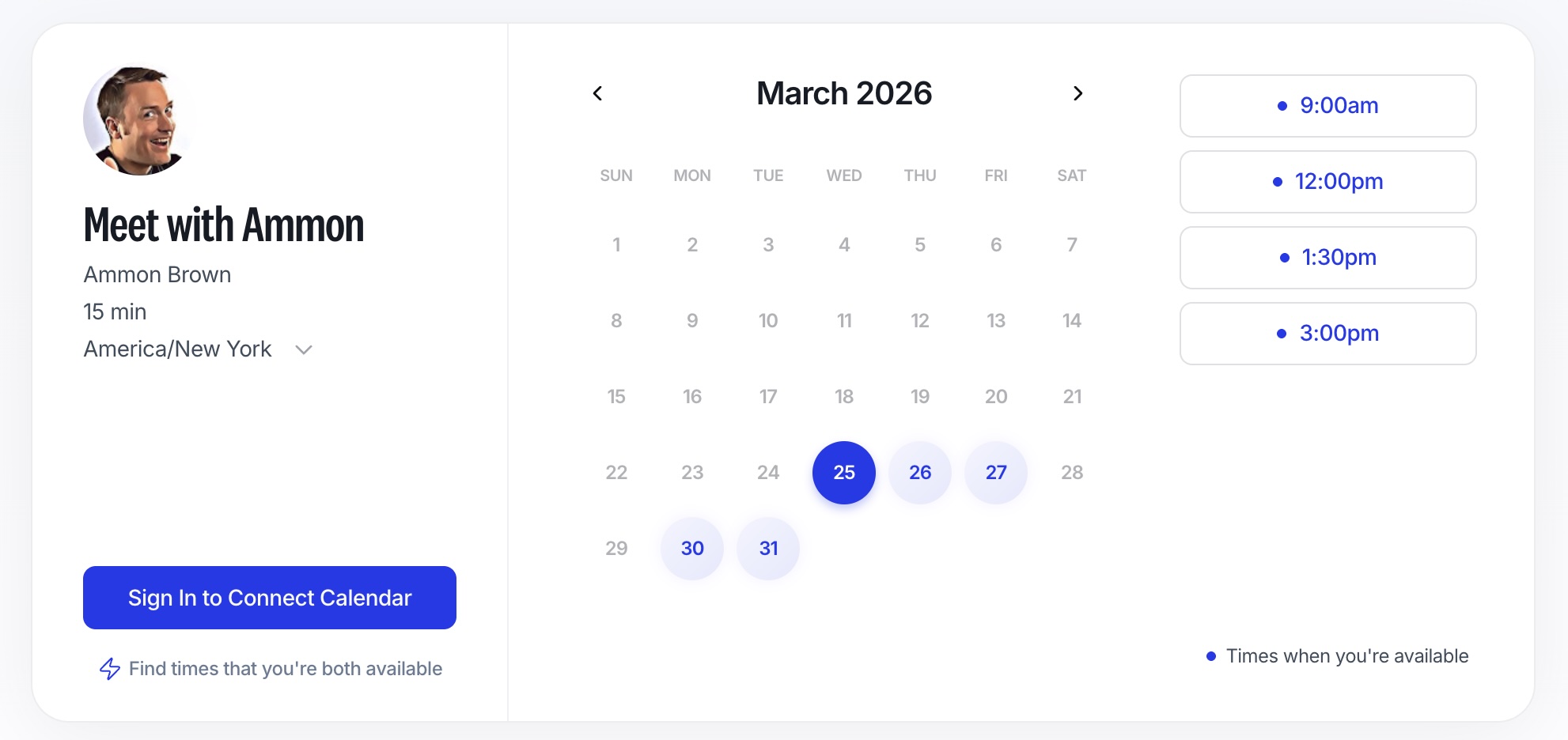
Your Personal Booking URL
Every user now has a custom booking URL you can share anywhere you already share your work life, email signature, LinkedIn messages, website, or a simple text message.
- More trust at first glance: A consistent, recognizable URL makes it clear the link is meant for scheduling with you.
- Less hunting for the right link: One home base for your availability, instead of digging through old messages or saved notes.
- Easy to remember: Great for repeat interactions, like ongoing clients, candidates, or partners.
Unlimited Links for Every Meeting Type
Not every meeting is the same, and your scheduling should reflect that. With Booking Links, you can create unlimited links based on your existing meeting types, like a 15 minute intro call, a 30 minute demo, a 45 minute onboarding session, or a 60 minute strategy review.
- Set expectations upfront: The meeting type tells people what they are booking and how long it will take.
- Stay organized: Different meeting types make it easier to keep your calendar tidy and your day predictable.
- Send the right option faster: No more rewriting “How long do you need” in every message.
Clean and Smooth User Experience
When you share a booking link, you want the experience to be positive for your guests (so do we!). Our intuitive and modern design was crafted with ease of use in mind.
- Easy to understand for recipients: A clear, focused booking page helps people feel comfortable booking.
- Better sharing everywhere: Links look nicer in chat apps, email, and social profiles.
Rescheduling and Cancelling Meetings With a Click
Sometimes your meeting guest needs to make changes to the meeting. Now you do not need to intervene, Workmate Scheduler provides your guests with the ability to reschedule or cancel through a unique link. And you can always email your Workmate Scheduler assistant and ask them to reschedule as well!
- Fewer emails: Booking links are completely self-serve, no intervention needed from you or your Workmate Scheduler assistant.
- Instant updates: Changes made through Workmate Scheduler will be reflected in your calendar instantaneously.
Free, Unlimited, and Ready Now
Booking Links are free, and you can create unlimited links based on meeting types. If scheduling the same types of meetings over and over is a big part of your work, this is an easy upgrade that helps you spend less time coordinating and more time doing the work that matters.
Try Booking Links Today
Open your dashboard, look for Booking Links in the sidebar, and create your first meeting type link. Add your personal booking URL to your email signature, send a link in your next message, or ask your Workmate Scheduler assistant to send it on your behalf! Now Workmate Scheduler can schedule all of your meetings from complex to simple. Try Booking Links now!
Scheduler
Hand your calendar to an assistant that never drops a thread.
Keep reading
![Let Your Assistant Coordinate Community Time [Expert Guide]](https://nuxxt0us9k7umi1n.public.blob.vercel-storage.com/blog-covers/6a4ebc18e5446b1eaa15183e_article-003cd0cc-ab45-4305-8f38-433069e4bc7d.jpeg)
Let Your Assistant Coordinate Community Time [Expert Guide]
Delegate: Let Your Assistant Coordinate Community and Volunteer Time Without Cluttering Work Hours - save hours & boost engagement. Read the expert analysis
![Meeting Fragility Scores: Proven Expert 2025 Guide [Cut 38%]](https://nuxxt0us9k7umi1n.public.blob.vercel-storage.com/blog-covers/6a0e468ce006c47c42cc8a49_article-e9063138-07a2-4c69-bb31-020d6afca8cc.jpeg)
Meeting Fragility Scores: Proven Expert 2025 Guide [Cut 38%]
Learn Meeting Fragility Scores: Rank High- and Low-Priority Events by Reschedule Risk and How Assistants Should Respond. Read the expert analysis
![24/7 Scheduling Coverage: When to Use Human+AI [Expert]](https://nuxxt0us9k7umi1n.public.blob.vercel-storage.com/blog-covers/6a0345582ddd36512328c560_article-da50835a-16c8-44bb-9278-55a3748b67d5.jpeg)
24/7 Scheduling Coverage: When to Use Human+AI [Expert]
Discover how 24/7 Scheduling Coverage: When You Need Human Assistants Backed by AI cuts errors 40% and boosts peak response 50%. Read the expert analysis